Google Sheets
Overview
Google Sheets integration automatically appends a new row to a spreadsheet in your Google Drive every time your API is called. A new spreadsheet file is created each month, and headers expand automatically when new fields appear.
It's the easiest way to collect data — sales, orders, inquiries — into a sheet without writing any code. Since the file lives in your own Drive, you can use Google Sheets the way you already do: share, filter, chart, or pivot freely.
This is an owner-only feature. Collaborators do not see the Google Sheets card.
How to get here
- Top menu APIs → click an endpoint name to open Endpoint Detail
- Start from the Google Sheets card on that page
Available on the Free plan as well — feel free to try it out.
What gets created in your Drive
When you start the integration, a top-level 3Min API folder is created in your Google Drive, organized like this:
3Min API/
├── user-signup/                              ← per-endpoint folder
│   ├── sandbox_user-signup_2026-04          ← monthly sheet (sandbox)
│   ├── sandbox_user-signup_2026-05
│   └── production_user-signup_2026-05       ← monthly sheet (production)
└── order-create/
    └── production_order-create_2026-05
- Folder name: the endpoint name (special characters are sanitized automatically)
- File name:
{environment}_{endpoint}_{YYYY-MM}(UTC month) - At the start of a new month, a new file is created automatically on the next call
Permission scope
3Min API requests only one Google permission: drive.file. This is a narrow scope that grants access only to files 3Min API itself creates. Your other Drive content (other sheets, documents, shared folders) remains inaccessible — your data stays your own.
Sheet column layout
Each sheet's first row (header) consists of two kinds of columns.
Meta columns (system info about the request)
| Column | Meaning |
|---|---|
record_id |
Unique ID for a single call (links to 3Min API logs and archives) |
created_at |
Time the call arrived (UTC) |
config_version |
Endpoint schema version used at call time |
operation |
create / read / update / delete |
status |
Processing result |
collaboration_key |
Which collaboration key was used |
Payload columns (business data carried in the request)
Each field in the payload is added as its own column with the payload_ prefix. Examples: payload_email, payload_amount, payload_address_city. The prefix keeps payload data clearly separate from meta columns.
When new fields arrive, new columns are added to the right of the sheet automatically. Existing rows leave the new column blank.
How to connect
Step 1 — Start from the Google Sheets card
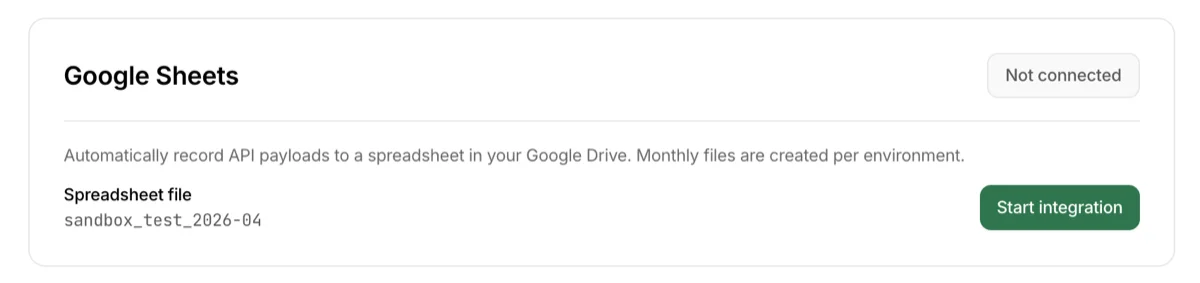
On the endpoint detail page, click the `Start integration` button on the Google Sheets card.
Step 2 — Google consent screen
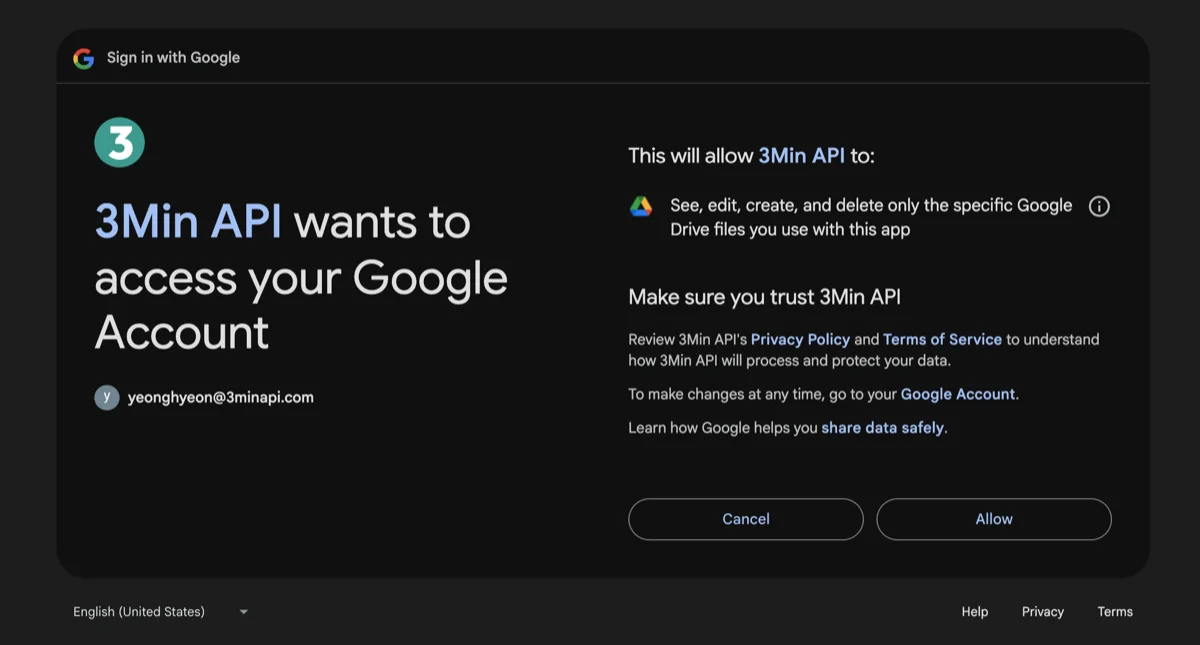
On Google's screen, confirm that 3Min API is asking for only drive.file and approve. Depending on your account, per-permission checkboxes may appear — if so, keep all checkboxes selected before approving so the Sheets integration works correctly.
Step 3 — Confirm the connection and the first row
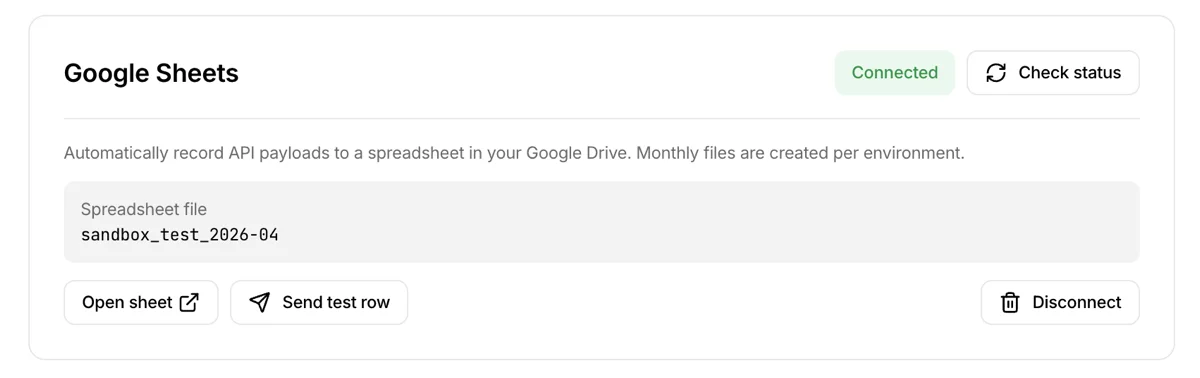
When the connection is complete, the card shows a Connected badge and the spreadsheet file name.
`Open sheet`— opens the Drive spreadsheet in a new tab`Send a test row`— appends a sample row to the sheet so you can verify it works. The fastest way to confirm the integration without writing any code`Disconnect`— stops automatic recording for this endpoint (the file in your Drive is kept)
From now on, every API call to this endpoint is appended as a new row at the bottom of the sheet automatically.
Things worth knowing
Processing speed
- Sheet writes are processed sequentially. The API call itself responds immediately, but a row typically appears in the sheet within a few seconds.
- When calls arrive in bursts, they queue up and are processed in order — rows may appear later than usual.
- On a temporary rate limit (429) or transient error, 3Min API automatically retries for about 5 minutes. During retries the row order in the sheet may differ slightly from the call order. If you need exact ordering, sort by the
created_atcolumn in the sheet.
Your data stays safe even if a write fails
If a sheet write ultimately fails after retries, only the row in the sheet is missed — the original data is preserved in Logs and Archives. Sheet write failures are sent to the Discord / Slack / Telegram channels you registered in System notifications (no email is sent).
When re-authorization is needed
In the following cases, sheet writes stop and a re-authorization notification (google_reauth_required) is sent.
- You revoked the
3Min APIapp from your Google account settings - Google expired the token (e.g., long-term inactivity)
- Permission checks were unchecked and
drive.filewas dropped
When you receive the notification, reconnect from External Integrations settings. After reconnecting, the existing sheet files continue to be used.
Each environment runs independently
Sandbox and Production Google Sheets integrations are fully independent. You can connect or disconnect each environment tab separately, and sheet files are created per environment.
Deploying to production does not carry your sandbox Google Sheets integration over. Switch to the production environment tab and click `Connect` on the Google Sheets card again.
How to disconnect
There are two ways.
Disconnect a single endpoint
On the endpoint detail page, click `Disconnect` on the Google Sheets card. Only this endpoint's automatic recording stops. Other endpoints' Google Sheets integrations are unaffected.
Disconnect entirely (revoke the Google account connection)
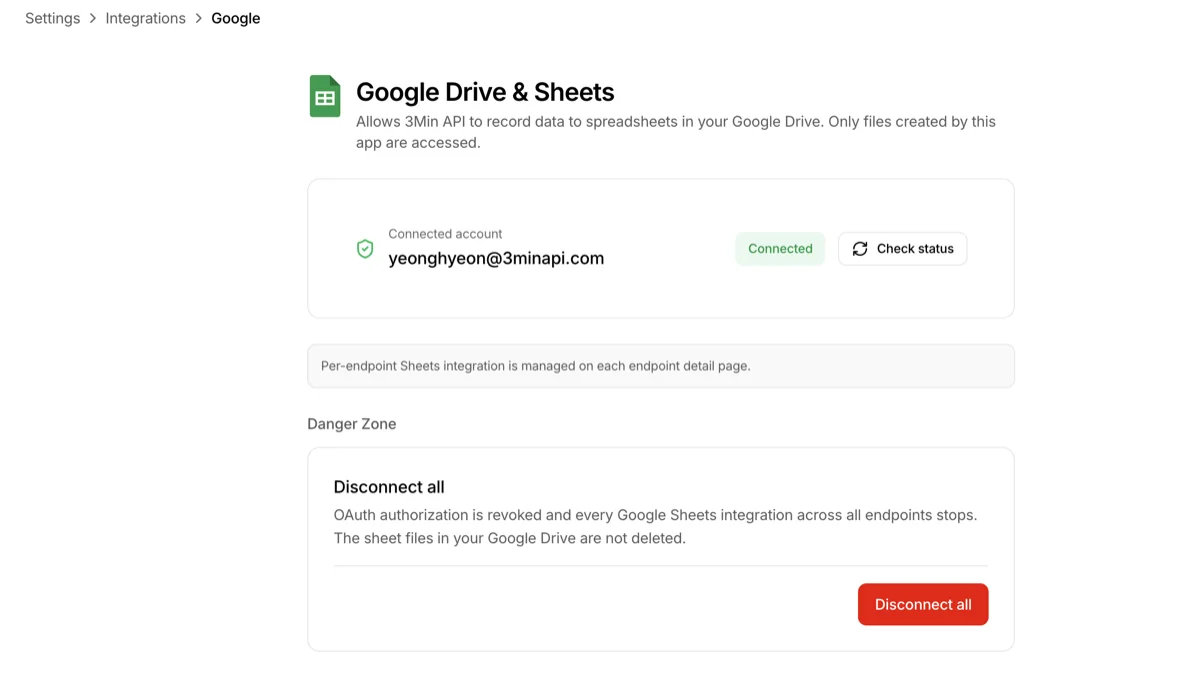
Top menu Settings → External Integrations → Google Drive & Sheets → click `Disconnect all` in the Danger Zone at the bottom of the page. All endpoints' Google Sheets integrations stop at once and the OAuth grant is revoked. To use it again, you'll need to connect from scratch.
What happens to your data after disconnecting
In both cases, the existing sheet files in your Drive are kept. If you no longer need them, delete them directly from Drive. Reconnecting later creates fresh files; previous files are not deleted automatically.
Common questions
I deployed to production but rows aren't being recorded to Sheets
Your sandbox Google Sheets integration does not transfer to production automatically. On the endpoint detail page, switch to the Production tab and click
`Connect`on the Google Sheets card to set it up separately. A newproduction_*file is created independently from your existing sandbox sheets.I connected, but I don't see any sheet file
Check the
3Min APIfolder at the root of your Drive first. The monthly file is created on the first call. You can create one immediately with`Send a test row`. If it still doesn't appear, check whether the External Integrations settings page is showing a permissions warning (yellow badge).New columns suddenly appeared in the header
When a new field is added to the endpoint, the sheet header expands automatically (the new column is left blank for older rows). This is intentional. Don't delete or reorder the header manually — column mapping for the next row may break.
Can I move or rename the sheet file?
Yes, that's safe. 3Min API tracks files by file ID, so you can move a file to another folder or rename it and rows continue to be appended to the same file. However, if you move it to the trash or permanently delete it, a new file is auto-created on the next call and the deleted file cannot be restored.
I deleted the entire
3Min APIfolderA new folder and new sheet are auto-created on the next call. Previously deleted sheets cannot be restored, so we recommend downloading anything you want to preserve from Archives ahead of time.
I'm getting too many sheet write failure notifications
Sheet write failure notifications are messages you receive when you've registered a Discord/Slack/Telegram channel under Endpoint Detail > Notifications. If those notifications are coming more often than usual, check the situations below.
3Min API retries to the end automatically and requests quota increases from Google to expand throughput where possible. If notifications still come often, it means the calls are exceeding the sheet write limit set by Google (typically around 60 writes per user per minute). This limit is set by Google policy, not by 3Min API, so we can't lift it on a per-user basis.
Honestly, this is a good sign that your business is growing. Google Sheets is great for lightweight recording and quick visualization, but it wasn't designed for traffic that consistently exceeds dozens of writes per minute. It may be time to consider the next step.