Create New Endpoint
Overview
An endpoint is a URL that can receive JSON data from external systems. 3Min API stores the incoming data, records logs, and optionally forwards it via webhooks.
On this page, you only need to enter a name, description, and optional required fields to create an endpoint. Required fields can be modified later on the detail page, so feel free to skip them at first.
After creation
- Automatically created in the sandbox environment
- A sandbox API key (
tm_test_prefix) is issued immediately - A production API key (
tm_live_) is also issued, but production calls are rejected and not logged until deployment - A public integration guide page link is automatically generated (Swagger-style testing + code samples)
How to get here
New Endpointbutton in the upper-right corner of the Dashboard- Left menu APIs →
Create New APIbutton in the upper-right corner of the list page
General
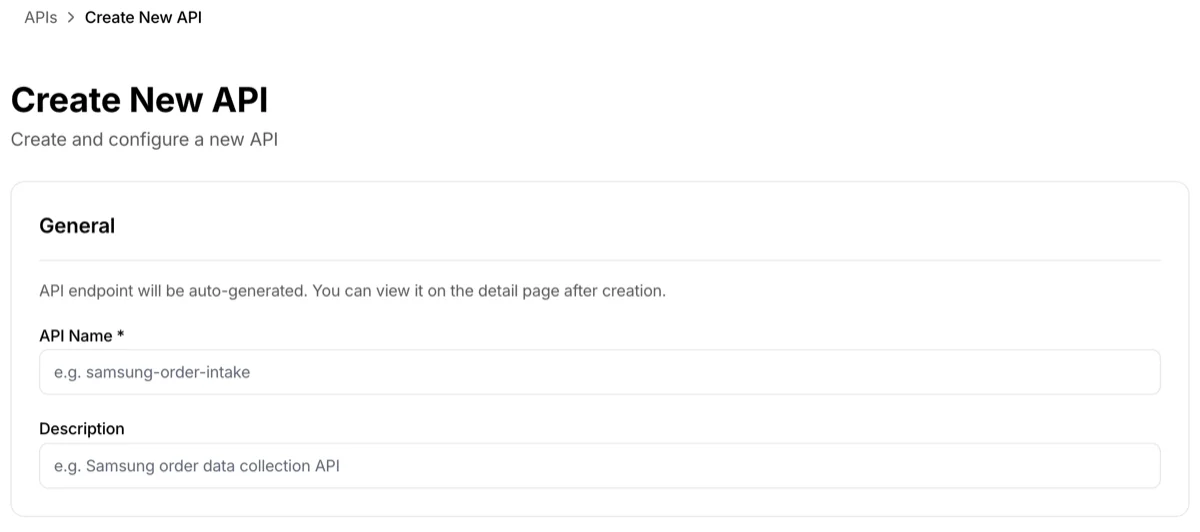
API Name
Required field.
- A user-facing name to distinguish the endpoint
- The actual API path (slug) is auto-generated, so choose a name that reflects the nature of your data
- Good examples:
contact-form,order-notification,wine-shop-sale - Avoid:
test,api1,my endpoint
- Good examples:
- Constraints:
- Cannot be empty
- Must be unique within the same account
- Maximum length limit applies (error message shown if exceeded)
Description
Optional field.
- A free-text description of the endpoint's purpose
- Record when this endpoint is called and what kind of data it receives for collaborators and your future self
- Example: "Order confirmation notification triggered on checkout completion"
- Can be edited inline later on the detail page
Required Fields
Optional. You can add them later on the detail page at any time.
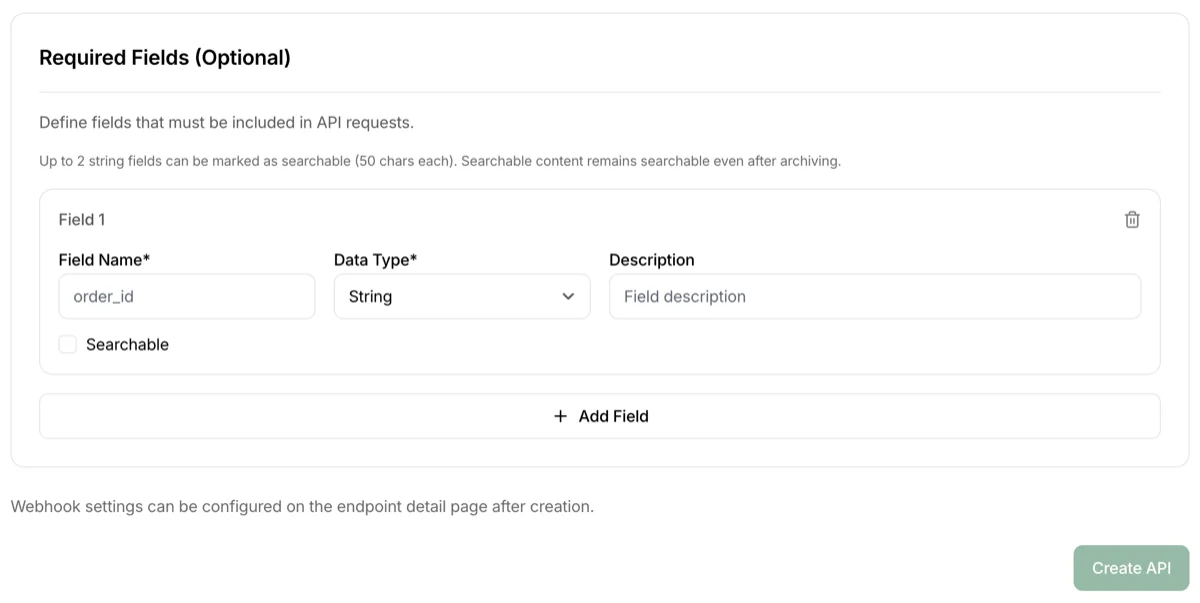
Pre-define JSON fields that must be included in API calls. If a defined field is missing from the request, the call is rejected.
Input fields for each entry
- Field Name: The field key (e.g.,
order_id,customer_email) - Data Type: Choose from
String,Number,Boolean,Object,Array - Field Description (optional): Description to share with collaborators
Constraints
- Field names must start with a letter or underscore, and only contain letters/numbers/underscores
- Duplicate field names are not allowed
💡 No setup needed for log search. From the Logs page, you can search across the entire payload using substring matching (minimum 3 characters). The previous "Searchable" option has been removed — every field is searchable by default.
Validation
Only checks whether the key exists in the JSON — the value's content or format is not validated.
You can skip this for now
If no required fields are defined, the endpoint accepts any JSON payload. Create the endpoint first, test in sandbox, figure out what fields are needed, and then add them on the Endpoint Detail page.
What's not on this page
- Webhook settings — Configure on the endpoint detail page after creation
- Collaboration key management / Invitations — Managed in Collaboration Keys on the detail page
- Production deployment — Use the
Deploy to Productionbutton on the detail page
After creation
Click Create API to automatically navigate to the endpoint detail page. Continue from there:
- Check the actual Endpoint URL on the Overview card
- Test a sandbox call with the Default API Key
- Set up Webhook / Collaboration Keys if needed
- When ready for production, deploy with
Deploy to Production
Troubleshooting
- Can I change the name later? — Yes, you can edit it anytime on the detail page Overview, including the description
- Do I need multiple endpoints? — In most cases, no. 3Min API uses document-style storage, so you can send nested JSON as one payload to a single endpoint. Only split endpoints when the events are fundamentally different (e.g., orders vs. inquiries)
- Should I define strict required fields? — Start with none, test with collaborators, and then add only the fields that truly must always be present