Archives
Overview
Archives is the page where you can download production data older than 30 days by date. Useful for analysis, backup, and moving data to external systems.
Archiving policy
- Production environment only. Sandbox data is not archived and is automatically deleted after 30 days
- Production data is retained permanently while your account is active, and can be viewed anytime on the Logs page
- Production data older than 30 days is automatically archived and can be downloaded by date from this page
- Archive files are created on a daily basis
- Two download formats are provided: JSONL (
.jsonl.gz) or CSV - Ready for analysis with pandas, DuckDB, jq, Jupyter, and more
How to get here
- Top menu Archives → Select an endpoint from the list to download
Endpoint list
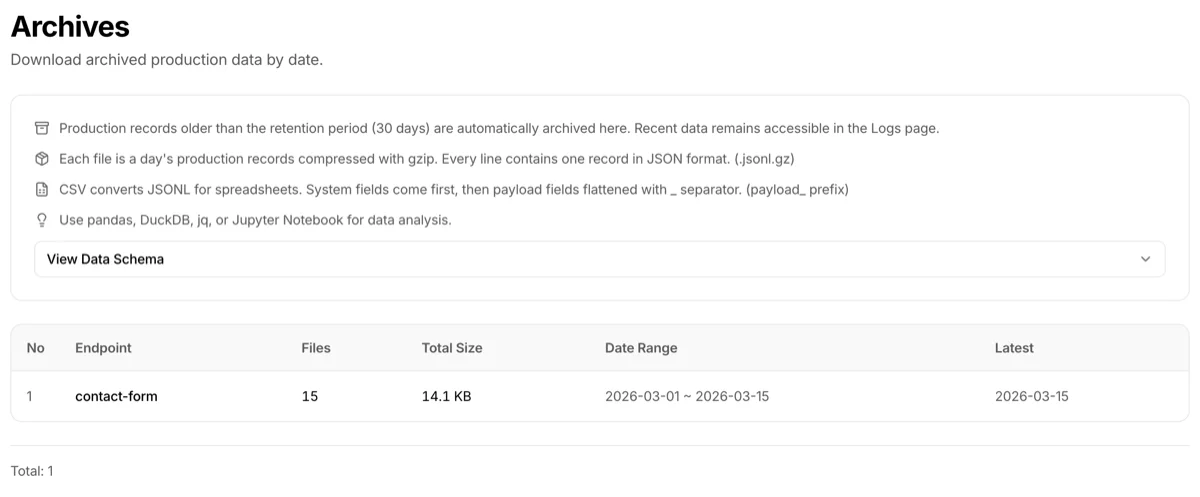
The top of the page shows an info card summarizing the retention policy and file formats. Below it, the View Data Schema accordion can be expanded to preview the archive file's field structure (same content as the "Archive file schema" section below).
Below that, a table lists endpoints with archived data.
| Column | Description |
|---|---|
| Endpoint | Endpoint name |
| Files | Number of archive files (daily) |
| Total size | Combined size of all archive files |
| Date range | Oldest to latest archive date |
| Latest | Date of the most recent archive file |
Click an endpoint to go to the archive file list page.
Archive file list
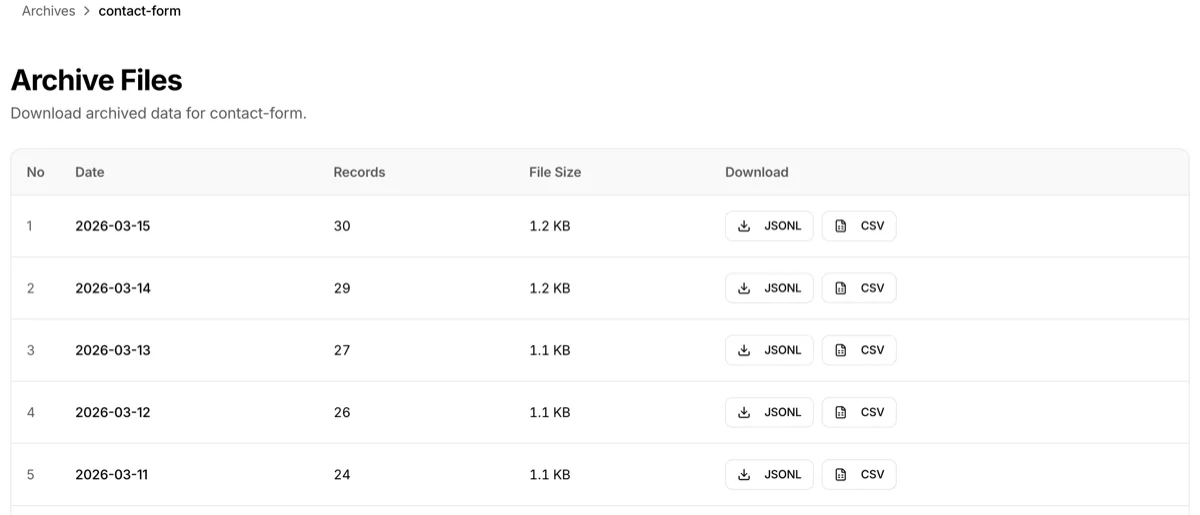
Selecting an endpoint shows its daily archive files.
| Column | Description |
|---|---|
| Date | Archive target date (UTC) |
| Records | Number of API calls recorded that day |
| File size | Compressed JSONL.gz file size |
| Download | JSONL / CSV buttons |
Two download formats
JSONL (.jsonl.gz)
- Daily production records compressed with gzip
- One JSON record per line
- Preserved in original format — suitable for programmatic analysis, backup, and reprocessing
- Example:
{"id":"rec_...","payload":{"order_id":"ORD-001"},"status":"success","created_at":"..."}
{"id":"rec_...","payload":{"order_id":"ORD-002"},"status":"success","created_at":"..."}
CSV (.csv)
- Spreadsheet-friendly format
- System fields come first, followed by flattened business fields with a
payload_prefix - Example:
payload.customer.name→payload_customer_name - Opens immediately in Excel, Google Sheets, etc.
- Note: CSV conversion may take time depending on file size and only works in PC browsers (due to large file processing)
Archive file schema
Field structure of each record in a downloaded archive file. Each JSONL line is one record. In CSV, system fields come first followed by flattened business fields with a payload_ prefix.
| Field | Description |
|---|---|
id |
Record ID |
payload |
Business data (JSON) |
config_version |
Schema version |
status |
Processing result (success / failed) |
error_details |
Error details (on failure) |
created_at |
Creation time |
updated_at |
Update time |
endpoint_name |
Endpoint name |
endpoint_slug |
Endpoint URL path |
collaboration_key_name |
Caller key name |
gateway_processing_time_ms |
Processing time (ms) |
Troubleshooting
- Archive list is empty: Production data must be older than 30 days to be archived. Check the Logs page for more recent data
- CSV download doesn't work on mobile: CSV conversion requires heavy processing and is PC browser only. JSONL can be downloaded from mobile
- Non-English characters are garbled when I open CSV in a spreadsheet: CSV files are UTF-8 encoded. Specify UTF-8 as the character encoding when opening in your spreadsheet to avoid garbled text
- Can I download archives on the Free plan?: Archiving is a paid plan feature. Free plan endpoints are auto-cleaned 7 days after creation, so archives aren't needed