 yeonghyeon · Apr 15, 2026
What Is JSON? A Beginner's Guide for Small Business Owners

Hi, I'm yeonghyeon, leading development at 3Min API.
In the last API post, I said "an API is a gateway that sends and receives messages of a specified shape at a specified address." I deliberately left the "shape of those messages" part for later — and today is that missing piece. This post is about the actual shape of the "messages" traveling between the container (database) and the gateway (API): JSON.
📚 Data Basics for Non-Developers — A Three-Part Series
- Database — The Container That Holds Data
- API — The Gateway for Safe Access
- JSON — The Shape of the Messages That Pass Through (Current)
The goal of today's post is not to "memorize syntax." It's to reach the sense that "I can write one event of my business as a single block of JSON." Once that sense is in place, talking to developers and AI becomes a step easier — you share the same language. No prior knowledge required.
What Is JSON
Let's start with the dictionary definition. Wikipedia describes JSON (JavaScript Object Notation) as "an open standard file format that uses human-readable text to store and transmit data objects consisting of attribute-value pairs and arrays."
In one line:
JSON = text written in an agreed-upon format so systems can exchange data while a human can still read it with their eyes.
There are actually several options for how systems exchange messages — JSON, XML, YAML, Protocol Buffers, and more. So why does today's web API overwhelmingly choose JSON? The reason is simple: both humans and programs can understand it at a glance. A developer can open it in a plain text editor and read it; a server can parse it quickly. Not many formats do both at the same time.
Why You Need an "Agreed-Upon Shape"
In the previous two posts, we built the tools called the container (DB) and the gateway (API). But having tools doesn't mean data starts flowing on its own. If every visitor to the teller window handed over a different piece of paper each time, the teller couldn't process a single request.
That's why banks set up standard forms in advance — deposit slips, withdrawal slips, wire-transfer request forms. The forms are the same shape every time, so the teller can validate them quickly and the bank can keep records automatically. An API sets up the exact same kind of promise: "messages arriving at this gateway must look like this." The standard syntax for writing that "shape" is JSON.
Before JSON became the default, every system invented its own message format. Some used comma-separated single-line text, some wrapped everything in XML tags, some made a custom binary format documented only inside the company. Every new partner meant digging through documents and writing new parsing code. Now that JSON is effectively the standard, a single sentence — "let's exchange JSON" — starts most collaborations.
Understanding JSON Through a Spreadsheet
Before diving into JSON syntax, let's start from a tool you're already familiar with: the spreadsheet. Picture a single sheet. The top row holds the column names (product, quantity, amount, …), and each row below it represents one transaction.
Moving that structure into JSON maps over very naturally.
- Spreadsheet column name → JSON key
- Value in a single cell → JSON value
- A single row → one JSON object (
{}) - Multiple rows → a JSON array (
[])
Suppose a row in the order sheet looks like this:
| order_id | product | quantity | amount |
|---|---|---|---|
| A-2026-0001 | Château Margaux 2020 | 2 | 480000 |
Moving that single row directly into a JSON object looks like this:
{
  "order_id": "A-2026-0001",
  "product": "Château Margaux 2020",
  "quantity": 2,
  "amount": 480000
}
A colon next to each name, a comma between items, a pair of curly braces wrapping the whole thing. That's every rule. This one block is a JSON object holding the exact same information as one row of the spreadsheet.
So if we already have spreadsheets, why do we still need JSON? The differences are hierarchy and flexibility. A spreadsheet struggles to put a table inside a single cell, and the moment rows start having different columns it falls apart. JSON, on the other hand, can put another object or array right in a value position, and optional fields that differ order by order fit in without trouble. If a spreadsheet is a "flat ledger," JSON is closer to a "ledger that folds like a folder when needed."
The Wine Shop Owner's Order Slip
Let's continue from last post's scene. A new order comes in from the online store. The POS and the partner restaurants are all looking at the same database, and the gateway connecting them is the API. Now let's actually peek at the message flying through that API.
The online store sends a single JSON block that looks like this to the wine shop's "create order" API:
{
  "order_id": "A-2026-0412",
  "customer": {
    "id": "C-00871",
    "name": "Alex",
    "email": "alex@example.com"
  },
  "items": [
    {
      "sku": "WINE-MARGAUX-2020",
      "name": "Château Margaux 2020",
      "quantity": 2,
      "unit_price": 240000
    },
    {
      "sku": "WINE-OPUS-2019",
      "name": "Opus One 2019",
      "quantity": 1,
      "unit_price": 520000
    }
  ],
  "total_amount": 1000000,
  "ordered_at": "2026-04-15T14:23:00+09:00"
}
Inside this one block you already see who (customer), what (items), how much (total_amount), and when (ordered_at) bought. The "folding ledger instead of flat ledger" phrase from earlier shows itself right here. The customer is a single block with its own sub-fields (name, email), and the purchased items are a list with two entries. In a spreadsheet, this information would require a separate customer sheet, order sheet, and order-detail sheet — but here it sits cleanly inside one envelope.
The moment the API gateway receives this envelope, it checks whether it matches the "agreed shape." If order_id is empty, if quantity contains something that isn't a number, or if email is missing inside customer, the gateway rejects it on the spot. Thanks to that, the database accumulates orders always in the same shape, which means later statistics or exports to another system won't stumble.
Once payment clears, the payment processor sends another JSON back to a different gateway of the wine shop saying "this order's payment succeeded." As I mentioned last time, this way of having the other system notify you first is called a webhook. The webhook body is also JSON. Request — JSON. Response — JSON. Notification — JSON. Nearly every message traveling between systems shares the same format, and that's a big part of why today's internet runs as smoothly as it does.
JSON Syntax: Keys, Values, Objects, Arrays
Now let's summarize the syntax very briefly. The rules JSON has are surprisingly few. Know these four and you can read 99% of any JSON.
1) Key-value pair — the smallest unit
The basic unit is a pair of a "name" and a "value" joined by a single colon. The name must always be wrapped in double quotes.
"product": "Château Margaux 2020"2) Kinds of values — four primitives + two structures
What can go in the value position is fixed.
- String: text in double quotes. e.g.,
"Alex" - Number: as-is, no quotes. e.g.,
480000 - Boolean:
trueorfalse(no quotes) - Empty:
null(meaning "no value yet") - Object: a bundle of key-value pairs wrapped in curly braces
{} - Array: a list of values wrapped in square brackets
[]
3) Object {} — a bundle of key-value pairs
Join several key-value pairs with commas and wrap them in curly braces, and you get one object. A single row of a spreadsheet maps to one of these objects.
{
  "name": "Alex",
  "email": "alex@example.com",
  "is_member": true
}
4) Array [] — a list of the same shape
List values inside square brackets, separated by commas, and that's an array. Multiple rows of a spreadsheet map to one of these arrays.
[
  { "sku": "WINE-MARGAUX-2020", "quantity": 2 },
  { "sku": "WINE-OPUS-2019",    "quantity": 1 }
]
Here's the real point. You probably noticed that each element of the array above is itself an object. A value position can hold another object or array. That single recursive rule is what lets JSON carry any complexity. The reason a wine shop order slip can express "one order containing multiple items, each with its own name, quantity, and unit price…" is exactly this.
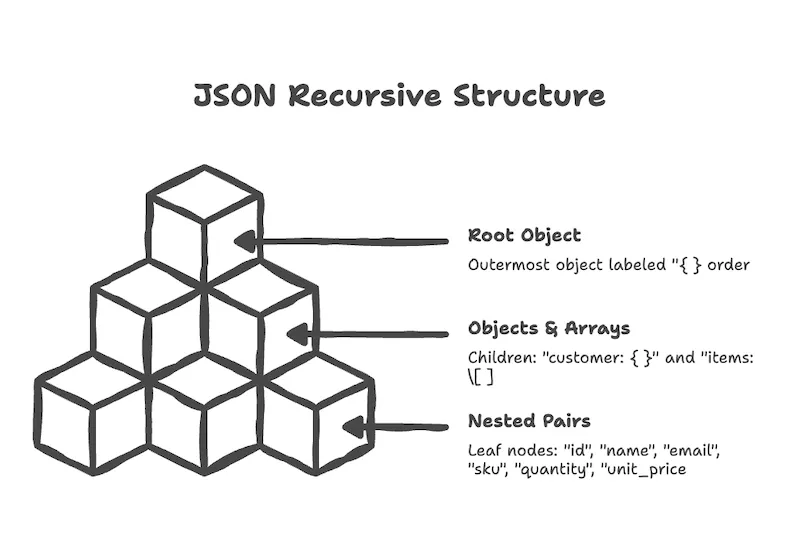
In one sentence, JSON is "key-value pairs are the basic unit; you can bundle them into objects and list objects into arrays. And a value position can hold another object or array." That's all of it.
Where JSON Shows Up
Outside the wine shop story, JSON is already deep in your daily life. It just isn't visible.
- Mobile-app-to-server traffic: Instagram feeds, the restaurant list in a delivery app, stock quotes in a market app — nearly all of it travels as JSON.
- Configuration files: VS Code settings and many developer tools' config files are JSON. They use JSON precisely because humans can open and edit them.
- Public data / open data: a large share of government and public-sector data APIs respond in JSON.
- SaaS integrations and webhooks: payment processors, shipping carriers, messaging platforms, and email senders all deliver their notifications as a single JSON block.
- Structured output from AI / LLMs: ask models like ChatGPT or Claude to "return the result as JSON" and you get a format ready to drop straight into your system. JSON is also the common language bridging AI and business systems.
Don't mistake JSON for "a format where anything goes." It's actually the opposite. As Chae-won emphasized earlier in your data deserves a plan, JSON only becomes powerful when the promise "this endpoint's JSON has these fields" is clearly fixed in advance. The syntax is free; the field design is not. Keep this distinction in mind and most misconceptions about JSON disappear.
Putting It All Together — The Trilogy Closes
Let's bundle all three parts at once.
- Part 1: Database — we built a container that stacks business data in the same shape.
- Part 2: API — we placed a gateway (window) that lets the outside reach that container safely.
- Part 3: JSON — we fixed the shape of the messages passing through that window.
The moment these three are in place, your business starts to look, for the first time, like a system that keeps running even when human hands step away. An online-store order comes in as a single JSON block through the API gateway and lands in the DB; the payment processor reports the result as a single JSON block; the store's POS decreases inventory with a single JSON block. While the owner sleeps, messages keep traveling on the same set of promises. "Automation" ultimately means the combination of these three promises.
More importantly, once you have these three concepts, every new term you'll meet later — GraphQL, event streaming, MCP, AI agents — is just a variation stacked on top of this skeleton. With the skeleton in place, the branches follow easily.
What You Can Try Today
Since this is the last post of the series, today's exercise is designed to connect with the previous two. Paper, an AI, and a web browser — that's everything you need.
Action 1. Write one event of your business as JSON
Take the event you chose in the previous API post (e.g., "create order," "register reservation," "receive inquiry") and move each of its fields into a single JSON block. You can start flat, and as you get comfortable, fold parts that grow bigger (customer, items) into an object inside an object.
{
  "reservation_id": "R-2026-0001",
  "customer": {
    "name": "Alex",
    "phone": "+1-555-0100"
  },
  "date": "2026-05-12",
  "party_size": 4,
  "note": "Window seat preferred"
}
This one block is the result of moving "one event of my business" into a shape the system can understand. Developers start from exactly the same scene when sketching an API spec.
Action 2. Verify the syntax with an AI and a validator
Paste the JSON you wrote in Action 1 into ChatGPT, Claude, or Gemini and ask something like:
Please check whether the JSON below is syntactically valid.
Point out any typos, missing quotes, missing commas, or mismatched
braces/brackets, and explain what to fix in terms a non-developer
can understand.

[paste the JSON from Action 1 here]
If you want a purely visual check, paste it into a public validator like JSONLint. A green "Valid JSON" means you've passed the syntax bar. Just repeating these two steps quickly sharpens your eye for JSON.
Action 3. Break the shape on your own endpoint
Some of you followed the quickstart in the API post and created your first endpoint on 3Min API. Today, go back to that endpoint's detail page and try two experiments on the same endpoint.
- Change the field structure — add one required field, or rename one, then call the endpoint with the new JSON shape and check whether it's saved correctly.
- Send broken JSON on purpose — drop a comma, leave a required field empty, or put a letter where a number should go, then call the endpoint. The whole point is to see what error the gateway sends back with your own eyes.
The meaning of the returned error messages and how to handle each is summarized in the troubleshooting guide. The moment you switch from "panic when an error appears" to "read the error code, narrow down the cause," you're already speaking the system's language.
👉 Don't have an endpoint yet? — the 3-minute quickstart
Closing the Trilogy — Where Will You Go Next?
By this point, you've picked up three tools. The container that holds your business data, the gateway that lets the outside in and out safely, and the shape of the messages that travel through it. There is of course much deeper material inside each of these topics. Still, the understanding you've gained so far is enough of a skeleton to extend your business onto the IT ecosystem and, further, to be ready for the AI era. The finer details can be layered on when the moment calls for them.
At this point you may wonder, "Isn't this developer work?" The good news is that thanks to AI, the line between developer and non-developer has become much blurrier than it used to be. What I'm suggesting is not that you write code yourself, but that you internalize the core principles of how IT moves as a kind of instinct. Sitting on top of that instinct — and leaning on the good tools that already exist — you'll start a cycle of building a small API, calling it, hitting errors, and fixing them. As that cycle compounds, a thought begins to surface on its own: "this part of my business could be automated, too." That very instinct is the starting line for pushing your business into a wider market.
Once the skeleton is there, something fun happens. Open up today's popular automation tools — n8n, Zapier, Make — and you'll see at a glance that every one of them runs on the same skeleton: API + JSON + DB. "Add a row to Google Sheets" is calling the Google Sheets API. "Send email via Gmail" is calling the Gmail API. "Upload a file to Drive" is calling the Drive API. These tools are essentially brokers that wire together countless already-public APIs via JSON. Someone who understands the skeleton can use the same tools far more intentionally.
So what should you actually do now? My suggestion is this: once you have a rough grasp of the full flow, go apply it small, experiment, and bump into things. Worrying about a custom system can wait until operations scale up and the need is obvious. There has never been a better era to start small. Cloud infrastructure, public APIs, LLMs, and no-code tools are all there to hold up that first step.
If you want a broader view on how AI intersects with running a business, AI Readiness for Small Business — Data, APIs, and What to Do Now is a good follow-up read.
Container, gateway, message. On top of these three promises, your business starts to move even after your hands step away. Thank you for coming all the way through the trilogy.
← Previous: What Is an API? A Beginner's Guide for Small Business Owners
Related Posts
What Is an API? A Beginner's Guide for Small Business Owners
A non-developer's guide to APIs told through the wine shop owner's story — why an API is a 'safe gateway', why building one is hard, and what you can try today without any prior knowledge.
What Is a Database? A Beginner's Guide for Spreadsheet Users
From paper ledgers to spreadsheets to databases — a relational database primer for non-developers, told through the growth story of a small wine shop.
Building a ChatGPT App with the Apps SDK: MCP, OAuth, and Notes from Submission
How we built and submitted 3Min API as a ChatGPT App. We picked the standard MCP SDK only (no OpenAI-specific wrapper), implemented OAuth 2.1 (RFC 7591/8414/9728) plus an API Key path for CLI tools, and learned to mark destructiveHint/openWorldHint conservatively after one rejection. The same code covers Claude Connectors as well.