 yeonghyeon · Apr 14, 2026
What Is an API? A Beginner's Guide for Small Business Owners

Hi, I'm yeonghyeon, leading development at 3Min API.
In the previous database post, we wrapped up the wine shop owner's story with one thing deliberately left for later. I said that once the online store opens, orders from the POS, the website, and partner restaurants all pile up in the same database automatically — but the tool hiding behind that word "automatically" is today's topic. It's the API.
📚 Data Basics for Non-Developers — A Three-Part Series
- Database — The Container That Holds Data
- API — The Gateway for Safe Access (Current)
- JSON — The Shape of the Messages That Pass Through
This post has one goal. Before studying the complex technology behind the word "API," let's first build the sense of "organizing the flow of your business as agreed-upon messages, not just in your head." Once that sense is in place, the rest follows naturally when you need it. You don't need any prior knowledge.
What Is an API
Let's start with the dictionary definition. Wikipedia describes an API (Application Programming Interface) as "a set of rules that lets applications exchange functions and data with each other."
In one line:
API = a gateway built so systems can exchange data with each other by agreed-upon rules.
There are several styles of API, but by far the most widely used on the web today is the REST (or RESTful) API. Today's story uses REST as its baseline. We won't dive into the technical details of REST itself. From a business point of view, one intuition is enough: "when you send a message of a specified shape to a specified address, you get back an answer of a specified shape."
One thing worth flagging. An API always returns an answer to a request. That answer is decided first by a single number that distinguishes success from failure, and the detail follows right after. Whether the order was saved correctly, or refused for some reason — that lives in this answer. We'll see the concrete shape again later with the wine shop story.
Why You Need a "Gateway"
Think of a bank for a moment. A bank vault holds every customer's money, but no customer ever walks into the vault. A teller takes requests in a specified format (deposit/withdrawal slips), confirms identity, and then processes them. Even the teller doesn't wander into the vault freely. Rules and permissions are fixed.
A database is in the same situation. Technically, you could reach into a DB directly over the internet and read and write data, but the moment you leave that door open to everyone, the business collapses. Someone could walk off with the entire customer list, someone could change product prices to zero, someone could wipe the whole inventory table.
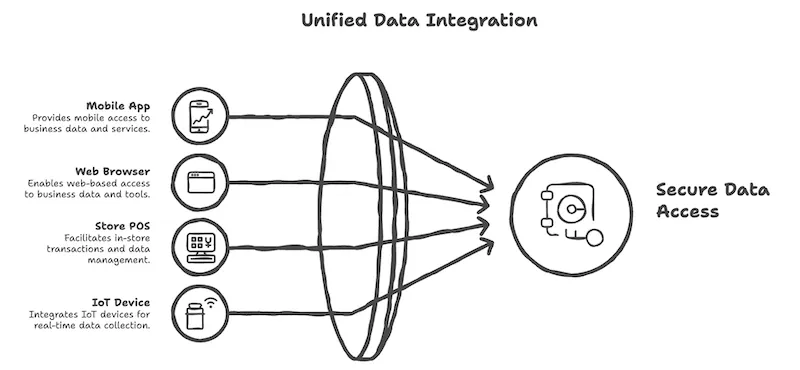
That's why you place an API as a gateway in front of the database. Every external request must pass through it. The gateway does three things: validation (is the request's format correct?), authentication and authorization (who are you, and what are you allowed to do?), and performing only permitted actions (a customer can look up their own orders but can never edit the price). It's the API — not the DB — that meets the outside world.
The Wine Shop Owner's API
Let's pick up from the last scene of the previous post. The wine shop owner opened an online store, and now the store POS, the website, and partner restaurants all look at the same database at the same time. The only reason this picture holds together is that each of them accesses the DB only through an API.
Put the three parties' requests into plain language and they look like this:
- Store POS → "Please save one order." (write)
- Online store → "Give me the list of wines Alex bought last month." (read)
- Partner restaurant → "Please decrease the stock of Château Margaux 2020 by 10 bottles." (update)
Each request comes in at a specified URL, carried inside a message of a specified shape. The message itself is usually a single block wrapped in a format called JSON. If the word JSON is unfamiliar, Chae-won's earlier post your data deserves a plan is a good quick skim. For today, you only need to picture it as "an envelope that carries one block of data in the agreed format."
Once the addresses and the shape of the messages are aligned in advance, orders keep coming in automatically while the wine shop owner sleeps, and the DB accumulates them in the same shape. No clerk has to retype anything; no online-store manager has to merge spreadsheets. Automation became possible because the rules were set.
So what happens after the gateway receives a request? An answer always comes back. That answer is decided first by a single number, not a human sentence. This number is called the HTTP status code, and although there are dozens of them, a business owner only needs to recognize three families.
- 200s — Success: the request was handled correctly. The order was saved, or the data you asked for comes back alongside. (e.g.,
200 OK,201 Created) - 400s — Bad request: something is wrong on the sender's side of the message. A required field is missing, authorization is missing, or the address doesn't exist. (e.g.,
400 Bad Request,401 Unauthorized,404 Not Found) - 500s — Server-side problem: something broke inside the gateway itself. Your request could be correct and still fail, so systems are designed to retry after a short delay. (e.g.,
500 Internal Server Error)
A block of JSON usually comes along right behind the number. On success it carries the ID of the saved order; on failure it carries what was wrong and why. If you send the wine shop API "an order with the quantity field missing," the gateway sends back a 400 with a message like "quantity field is required." Thanks to this promise, systems with systems — and humans with systems — can tell success from failure in the same language.
APIs Are Actually Everywhere
Even outside the wine shop story, almost every app you used today was calling someone's API behind the scenes. The Instagram feed is the server's DB being read through an API. A Tesla driver checking the car's status in the mobile app, a weather app showing today's rain, a delivery app showing a restaurant's menu — all the same. More recently, the order button on a fridge, the voice assistant in a car, and smart speakers all run on top of APIs.
The API we've been discussing so far was the "when I need to, I walk over to the other party's gateway and send a request" style. The opposite also exists: the other system comes to my gateway first and says, "something just happened." A payment processor pushing a notification to my server the moment a payment completes is the classic example. This style has its own name: webhook.
The thing is, APIs and webhooks are technically identical. The request address, the shape of the message, the authentication method, the response codes — not a single one is different. They're the same tool exchanging a block of JSON over the same HTTP gateway, and the code that calls them is nearly indistinguishable. So why use different names? Early web APIs were mostly designed for the "I call when I need something and pull it back" use case. Over time, the opposite direction — "when an event happens, the other side pushes it first" — became more and more common, and around 2007 the name webhook was coined specifically to label that reverse direction. The technology didn't split in two; a second role name just got added to the same tool.
So remember it this way: if I call first, it's an API; if the other party calls first, it's a webhook.
So How Do You Build an API?
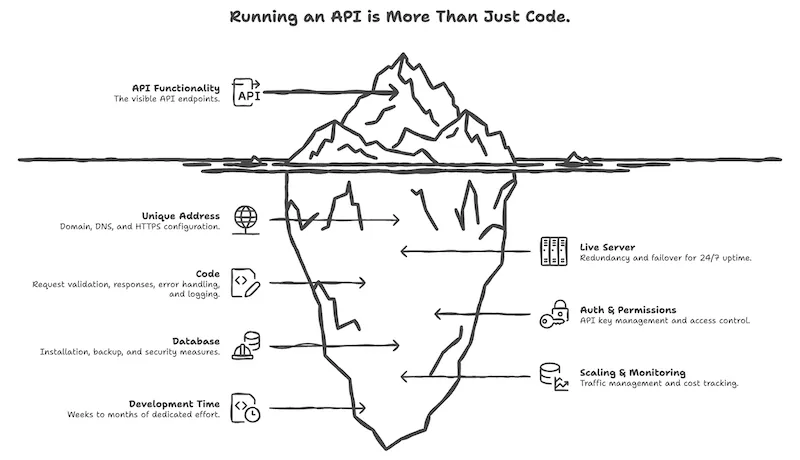
By this point it's natural to think, "OK, I should just make an API for my business too." But to actually run an API "safely, 24/7/365," you need more pieces than you'd expect. Let me list them plainly.
- A unique address: you need to be callable from the internet, so you buy a domain, configure DNS, and attach an HTTPS certificate.
- A 24/7 live server: if even one goes down, sales stop. You need multiple servers, failure detection, and auto-recovery.
- Code: you write code that receives requests, validates them, distinguishes errors, returns responses in a specified shape, and keeps logs.
- Authentication and permissions: you need to tell who can call which API. Issuing API keys, expiring them, and deactivating stolen ones is ongoing operations.
- Database integration: the DB has to be installed and operated separately. Backups, security, and performance tuning run alongside the API.
- Scaling and monitoring: traffic should automatically scale up during spikes and scale down the rest of the time to save cost. You also need a dashboard watching error rates, response times, and cost in real time.
You don't have to build every piece alone. Cloud platforms like AWS, Google Cloud, Cloudflare, Firebase, and Supabase each provide some of these pieces. But choosing, stitching, and operating the pieces is itself a specialist domain. A business owner building this from scratch typically spends weeks to months of a backend engineer's time.
Recap So Far
Tying it back together:
- An API is a gateway that lets you reach a database safely.
- The gateway only accepts requests at specified addresses with messages of a specified shape.
- Because of this agreement, many systems can move forward while looking at the same data at the same time.
- While you're asleep, APIs are being called, and one side is calling another's API. The substance of automation sits on top of these agreements.
What You Can Try Right Now
In the previous database post, we drew the data structure of a business across three Excel sheets. Today let's picture the "gateway" through which that data flows. You only need your head and an AI — no code, no server, no payment required.
Action 1. Sketch one endpoint for your business
Pick one of the "people / things / transactions" sheets from the previous post and define "the event that brings a new row into this sheet." Example: "when a new online order comes in." Write just three lines on paper:
- Event name: e.g., order created
- Who sends it: e.g., online store, store POS, customer form
- What data it carries: e.g., customer number, product number, quantity, amount
These three lines are the design of a single endpoint. When a developer sets out to build an API, the first sketch they draw lives at exactly this level of detail.
Action 2. Ask an AI for the full plan
Paste your Action 1 notes along with the prompt below into ChatGPT, Claude, or Gemini (any of them).
Using the following service documentation, please walk me through — step by step, in terms a non-developer can understand — how I could actually implement the endpoint I just outlined.

https://3minapi.com/llms-full.txt
The answer will most likely point in the direction of "create one endpoint and POST each order as a single JSON block." Don't be rattled if the terminology feels unfamiliar — just remember that you're opening the one "gateway" you learned about today.
Action 3. Try your first API in three minutes
Buying a domain, spinning up a server, and installing a DB yourself is overkill at this stage. Follow the quickstart guide below and you can walk through the whole flow — create a database → create an API endpoint → call it → confirm the record landed in the DB — in under three minutes.
A question might come up here: "I created an API, but when did I create the database?" As I mentioned above, normally you'd install and run the DB separately, but in 3Min API, when you define the fields of an endpoint, the storage that matches those fields is created behind the scenes at the same time. For you as the owner, designing the gateway (API) is enough — the vault (DB) is prepared alongside it. That's why "3 minutes" is part of the name.
👉 How to create an endpoint without a developer — quickstart guide
Up Next
In the previous post we looked at the container that holds data, and today we looked at the gateway that bridges that container with the outside world. If you've made it this far, one question is left: "What, exactly, do the messages passing between containers look like?"
In the next post we'll cover the shape of those messages — JSON. Follow along to see exactly which envelope a single wine shop order rides in as it moves from the POS to the server, and from the server to the online store.
← Previous: What Is a Database? A Beginner's Guide for Spreadsheet Users
→ Next: What Is JSON? A Beginner's Guide for Small Business Owners
Related Posts
What Is JSON? A Beginner's Guide for Small Business Owners
A beginner's guide to JSON that closes out the wine shop owner's story. Starting from a spreadsheet, we follow the recursive structure of keys, values, objects, and arrays — ending with a today-you-can-do-it practice where you write one of your own business events as JSON, no prior knowledge required.
What Is a Database? A Beginner's Guide for Spreadsheet Users
From paper ledgers to spreadsheets to databases — a relational database primer for non-developers, told through the growth story of a small wine shop.
Building a ChatGPT App with the Apps SDK: MCP, OAuth, and Notes from Submission
How we built and submitted 3Min API as a ChatGPT App. We picked the standard MCP SDK only (no OpenAI-specific wrapper), implemented OAuth 2.1 (RFC 7591/8414/9728) plus an API Key path for CLI tools, and learned to mark destructiveHint/openWorldHint conservatively after one rejection. The same code covers Claude Connectors as well.