 Chae-won · 2026年4月3日
Automate Order Data with n8n: From API to Google Sheets and Slack in 5 Minutes

Hi, it's Chae-won.
So you've set up a 3Min API endpoint and your partners are sending order data. Great — everything's being stored automatically. But now you're thinking:
"Can I get this data into Google Sheets too? And maybe a Slack notification whenever a new order comes in?"
You absolutely can. And it takes about 5 minutes. Zero code.
In this guide, we'll connect 3Min API to n8n — a workflow automation tool — so that every incoming order automatically gets logged to Google Sheets and triggers a Slack alert.
How it works
Here's the full picture:
- Your partner sends order data to your 3Min API endpoint
- 3Min API stores the data and fires a webhook
- n8n receives the webhook and does two things at once:
- Appends a row to Google Sheets
- Sends a notification to Slack
Simple, fast, and endlessly customizable.
Why route through 3Min API?
You might be thinking: "Why not just send data directly to n8n or Google Sheets?"
These tools have per-second throughput limits. That's fine under normal load — but the moment orders spike, requests that exceed capacity are silently dropped.
If your partner's system sends a burst of orders — or if n8n goes down for maintenance — data gets lost. There's no retry, no record, just a silent failure.
With 3Min API in front, your data is always saved first. The webhook to n8n is a bonus, not a lifeline. Even if n8n is offline, every record is safe in your 3Min API dashboard — searchable, readable, and ready to pull once n8n is back.
Think of it as a safety net. In business, losing data isn't just inconvenient — it can be costly. 3Min API makes sure that never happens.
Step by step
1. Create your endpoint
Log in to 3Min API and create a new endpoint. Give it a name and description:
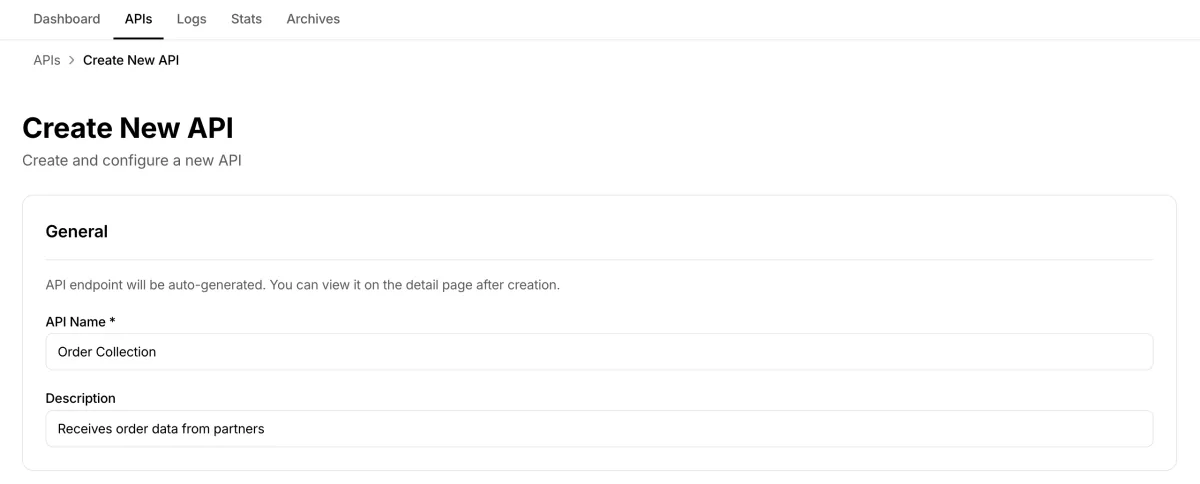
Creating the "Order Collection" endpoint — just a name and description to start.
Then define the fields your order data will contain. Required fields are optional but recommended — they ensure your partners send correctly structured data.
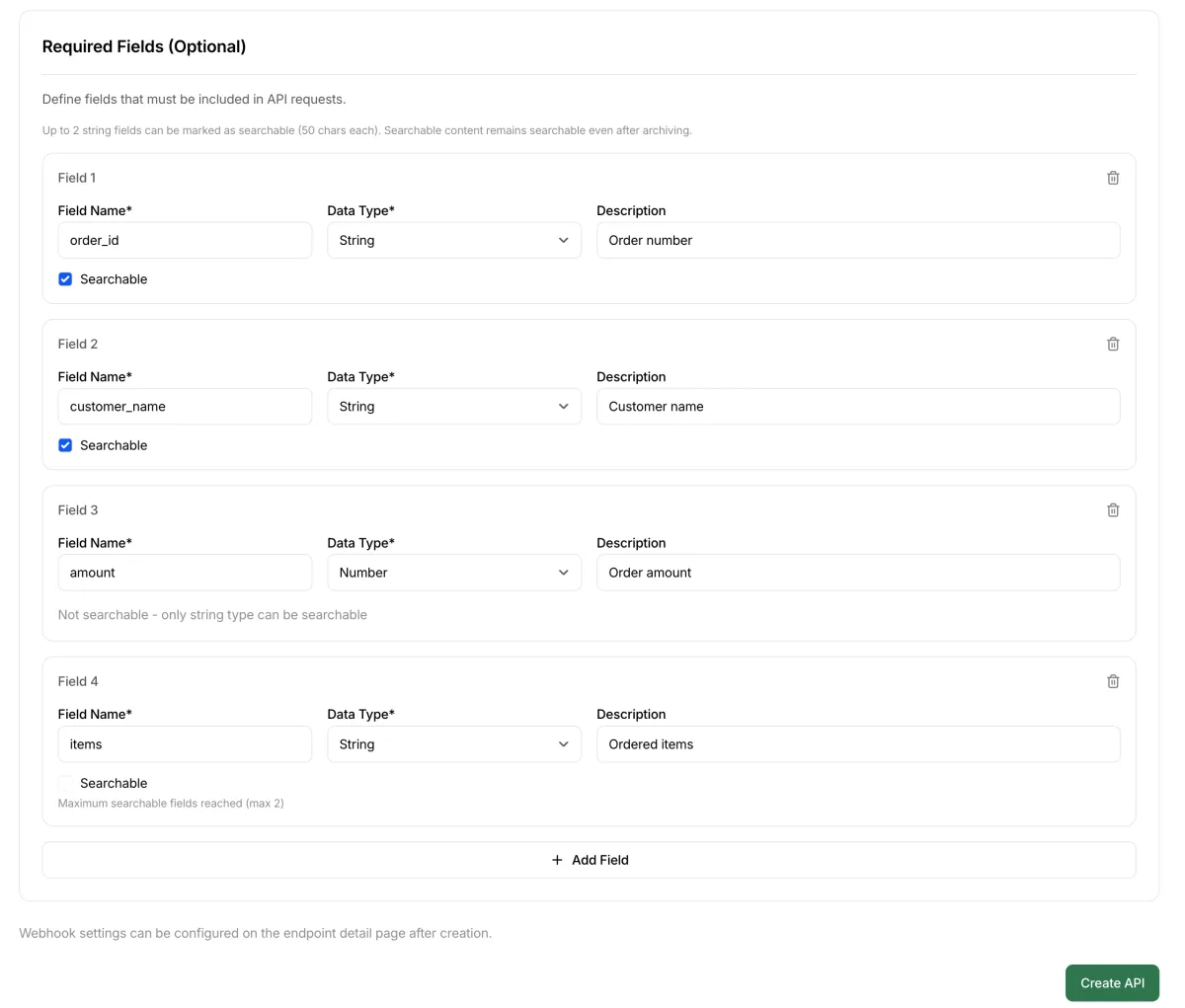
Setting up required fields: order_id, customer_name, amount, and items. The searchable flag on order_id and customer_name lets you search by these values later.
2. Set up n8n workflow
We've prepared a ready-to-use n8n workflow template. Here's what the finished workflow looks like:
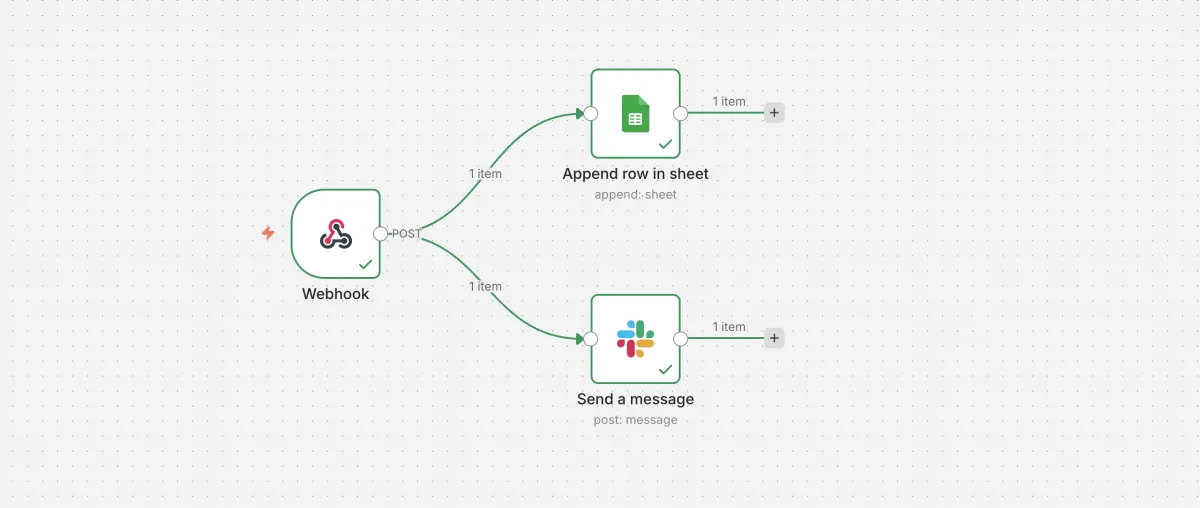
The complete workflow: one webhook trigger, two parallel actions.
To get started quickly, download the template and import it into n8n:
- Download the workflow template JSON
- In n8n, click the three-dot menu (⋯) → Import from File
- Select the downloaded JSON file
After importing, configure each node:
- Google Sheets node
- Create a new spreadsheet in Google Drive and enter column headers in the first row:
Record ID,Order ID,Customer Name,Amount,Items,Received At - Click the node and link your Google account under Credential to connect with
- Under Document, select the spreadsheet you just created (it will appear in the list once authenticated)
- Under Sheet, select the default sheet (automatically created with the spreadsheet)
- Create a new spreadsheet in Google Drive and enter column headers in the first row:
- Slack node
- Click the node and link your Slack workspace under Credential to connect with
- Under Channel, select the channel where you want to receive notifications
- Webhook node
- Click the node and copy the generated webhook URL (you'll paste it into 3Min API in the next step)
- Click "Execute workflow" (switches to test listening mode)
3. Connect the webhook
Back in your 3Min API endpoint detail page, find the Webhook section. Paste the n8n webhook URL here:
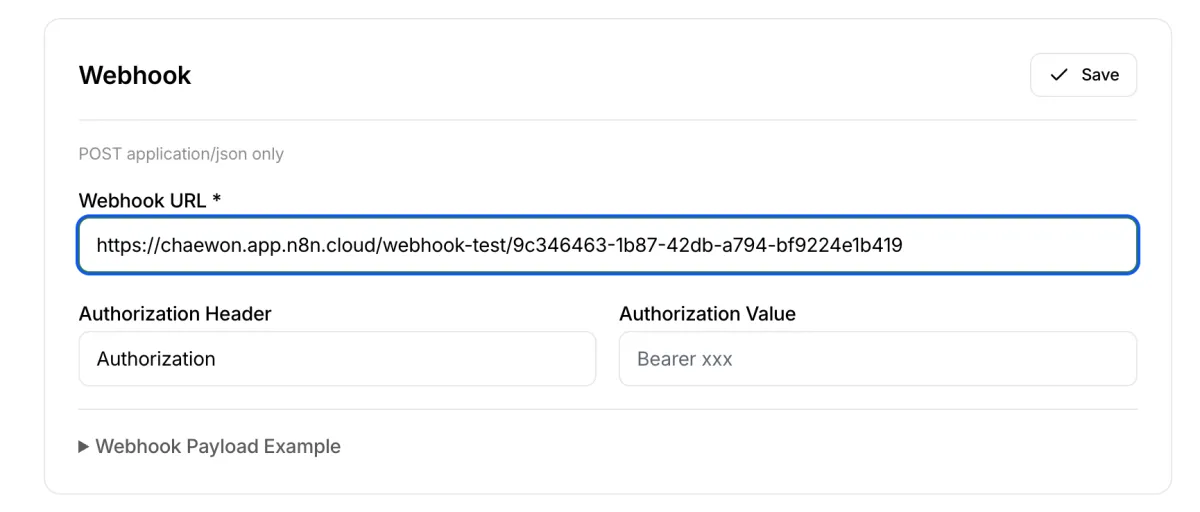
Pasting the n8n webhook URL into the endpoint's webhook settings.
Hit Save, and the connection is live.
4. Test it
Go to your endpoint's integration guide page and send a test request. You'll see the familiar 202 response — meaning the data was queued, stored, and the webhook was fired.
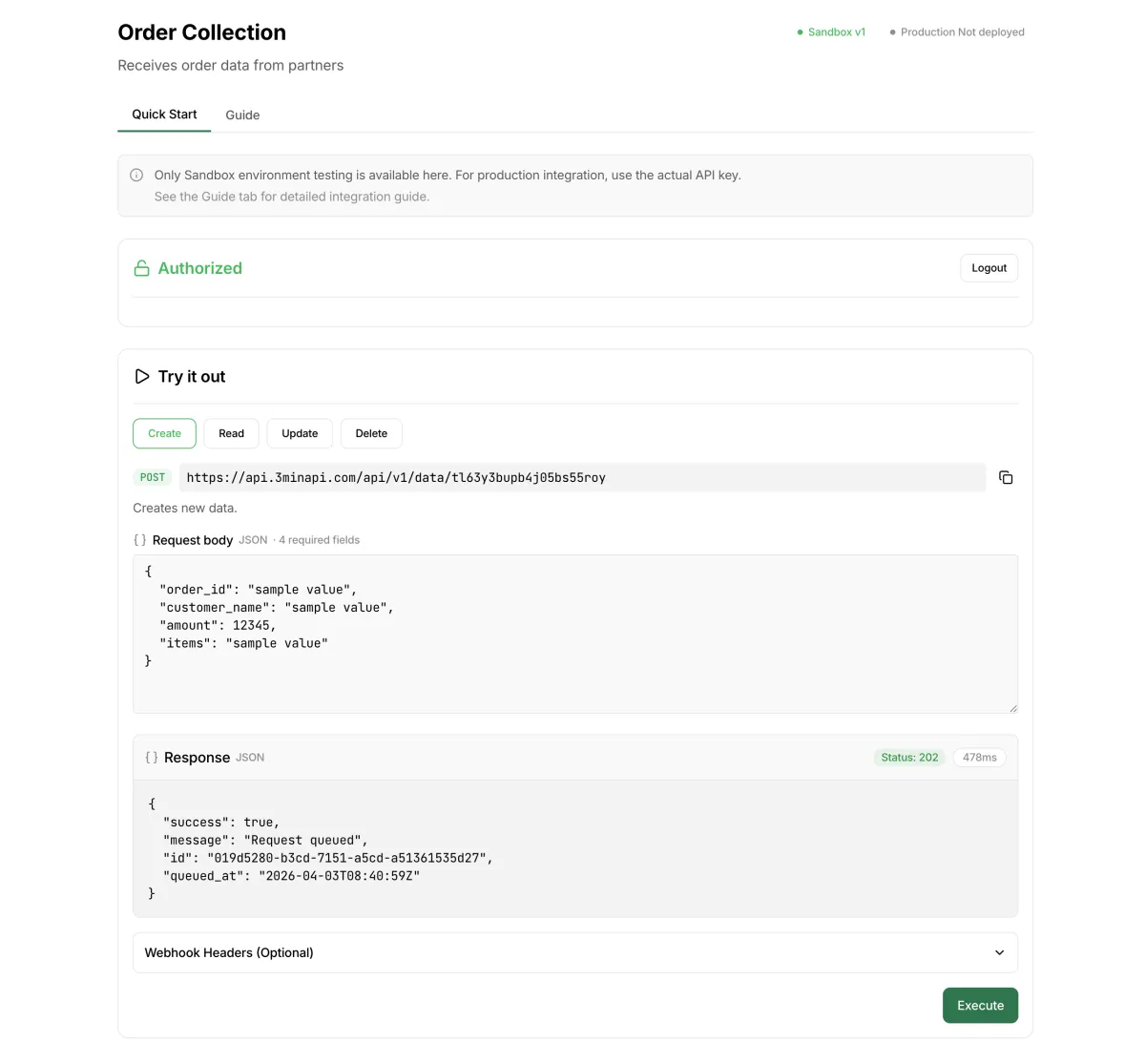
A successful test: 202 Accepted, data stored, webhook delivered.
Now check Google Sheets:

Three test orders, automatically logged. No copy-pasting, no manual entry.
And your Slack channel should have a notification too. That's it — the entire pipeline is working.
Going to production
Once testing is complete, it's time to go live:
- Click "Deploy to Production" on your 3Min API endpoint detail page
- Click Publish in your n8n workflow — this activates the Production Webhook URL
- Update 3Min API's Production webhook URL to n8n's Production Webhook URL (different from the test URL)
- Share the Production API key (
tm_live_*) with your partner
Security note: In this guide, we skipped webhook authentication to keep things simple. For production use, we recommend setting up Header Auth in the n8n Webhook node and entering the same credentials in 3Min API's webhook Authorization Header/Value fields.
What you can do next
This workflow is intentionally simple. But n8n is incredibly flexible, and 3Min API's webhook works with any HTTP endpoint. Here are some ideas:
- Swap Slack for Discord or Telegram — just replace the Slack node
- Add conditional logic — route high-value orders (e.g., amount > $1,000) to a different Slack channel
- Replace Google Sheets with Notion or Airtable — n8n supports hundreds of integrations
- Aggregate multiple endpoints — send webhooks from several 3Min API endpoints to one n8n workflow
- Use Make or Zapier instead — the same webhook pattern works with any automation platform
The key idea: 3Min API handles the receiving and storing. Your automation tool handles the rest.
Wrapping up
With 3Min API as your data collection layer and n8n as your automation engine, you get a reliable, no-code pipeline that:
- Never loses data — even if your automation tool goes down
- Scales with your business — handles growing traffic without additional development
- Takes 5 minutes to set up — and seconds to customize
Give it a try. Create an endpoint, connect n8n, and see your first order flow through automatically.
If you have questions or want to share what you've built, reach out at contact@3minapi.com.
Related Posts
Webhooks, Polling, and Now Tasks — A Third Way to Hand Work to AI
Webhooks and polling both fall short when you ask an AI to run a job that takes a while. Here's why we built Tasks and how they work, explained with the same delivery analogy.
How to Create an API Endpoint Without a Backend
A step-by-step tutorial: create an API endpoint in minutes — no coding, no server, no backend required.
Webhook vs Polling — Which Approach Is Right for You?
Two ways systems exchange data — webhooks and polling. Compare their pros, cons, caveats, and how to combine them in practice.