WordPress Plugin User Guide
This guide has four sections. §1 Quick Start walks you through publishing your first shortcode with screenshots, while §2–§4 are the deeper references you'll return to when authoring or troubleshooting.
1. Quick Start
First install the plugin, then open 3Min API → + New in WordPress admin to launch the snippet builder. Following the steps top-to-bottom completes one shortcode.
New here? Take a 3Min API tour to see how endpoints and API keys are issued, or search for "3Min API" on ChatGPT Plugins or Claude Connectors and start the conversation right there.
1.1 Install the plugin
3Min API Connector ships as a downloadable ZIP — install it from the WordPress admin in a few clicks.
- Download the plugin:
3minapi-connector-1.0.1.zip. - Open your WordPress admin.
- Go to Plugins → Add Plugin.
- Click Upload Plugin and select the ZIP you just downloaded.
- Click Install Now.
- Click Activate Plugin.
Updates ship the same way: the plugin checks for new releases and prompts you to update right from the Plugins screen.
1.2 Endpoint setup + test
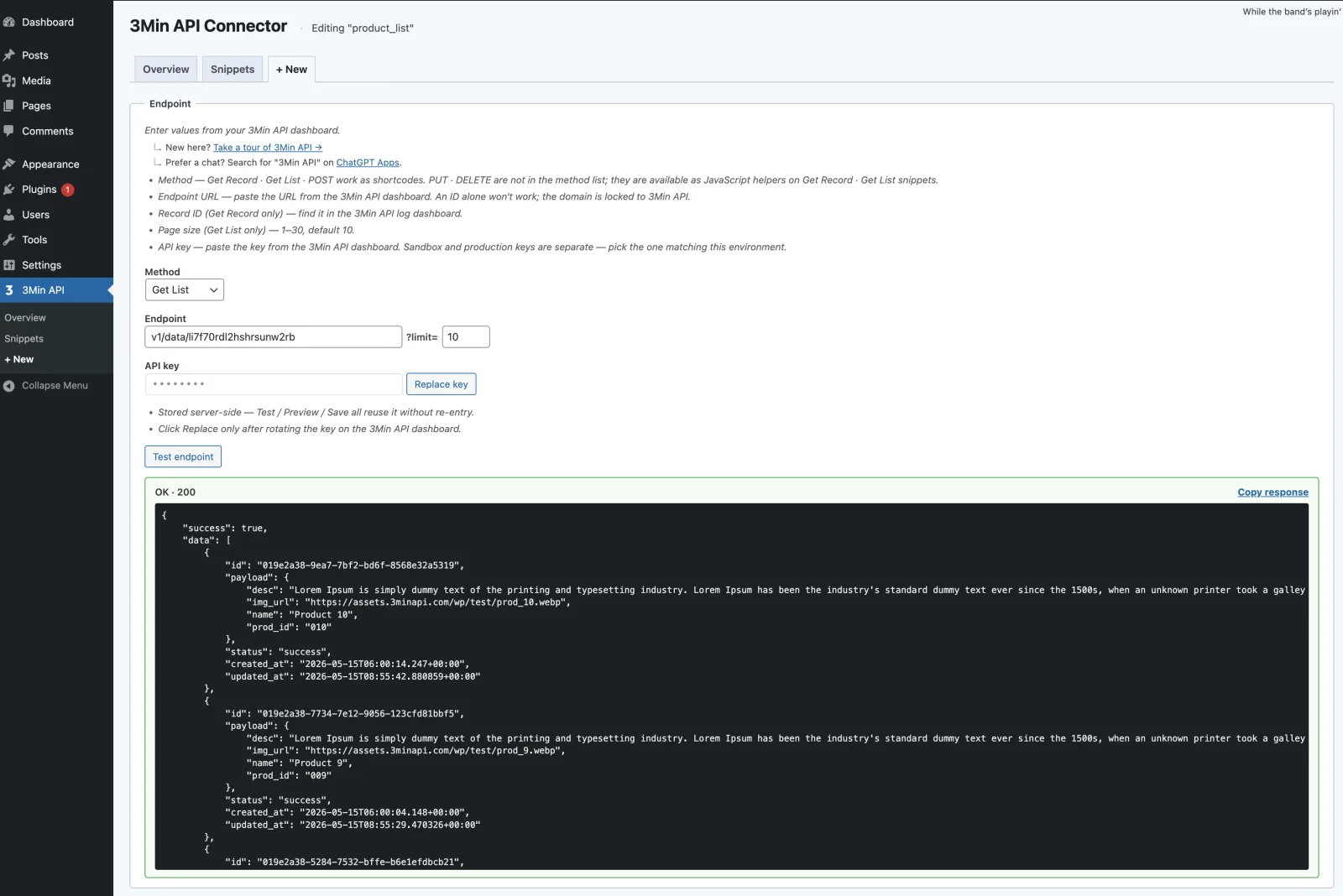
- Paste your endpoint ID and API key, then pick an HTTP method (Get Record / Get List / POST).
- Click Test endpoint — a real request fires and the response shows up inline right below.
- When the response looks good, the next cards (variables, templates) populate automatically.
POST endpoints can't be previewed from the builder. Save the shortcode first, drop it into a page, and submit the form to verify.
1.3 Variables

The plugin reads your test response and surfaces available template variables as chips. The most common ones:
{{response}}— the full response{{response.payload}}— the user record body{{response.payload.title}},{{response.id}}— drill in with "dot notation"
Drop these straight into your HTML/CSS in the next step; values are sanitized automatically.
1.4 Pick a template + design with AI
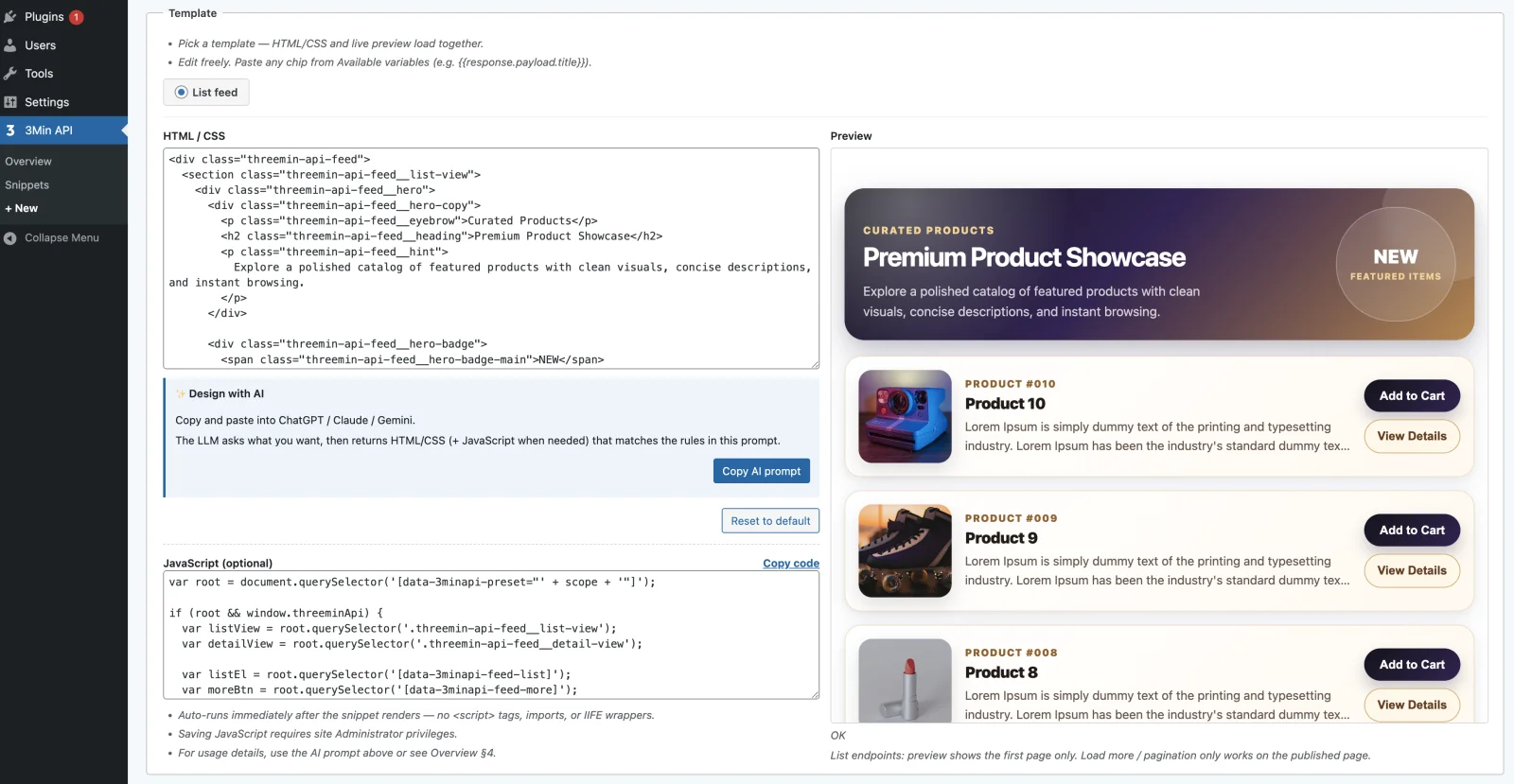
- Picking a method-specific template auto-fills both the HTML/CSS and JavaScript panels.
- The Copy AI prompt button at the top bundles the selected template code, the plugin's authoring rules, and the detected variables into a system prompt copied to your clipboard.
- Paste it into ChatGPT / Claude / Gemini and iterate naturally — "make it more minimal", "default to dark mode", "show star ratings", and so on.
- Drop the result back into the HTML/CSS panel (and the JavaScript panel if needed), then check the live preview on the right.
The JavaScript panel is optional. Only site administrators can save JavaScript.
1.5 Save + publish

- Enter a snippet name (locked after the first save).
- Hit Save — the builder generates a shortcode in this form:
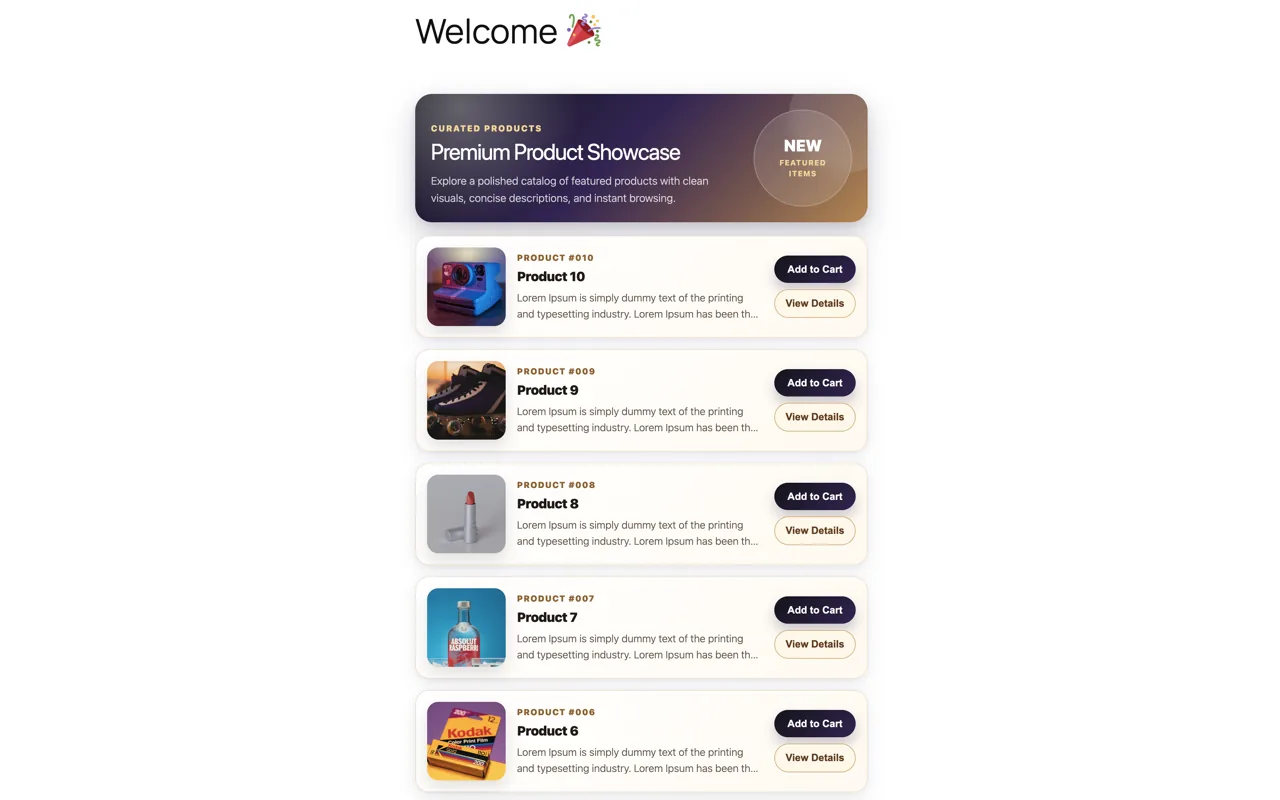
[3minapi name="your-snippet-name"] - Paste that one line into any post, page, widget, or block, and your UI renders right there.
The same shortcode works on multiple pages, and a single page can host several different shortcodes — each renders independently.
2. HTML/CSS guide
When you save, some HTML/CSS is automatically stripped for security. The sections below describe what survives the save and how to write to that contract.
2.1 How rendering works
- Get Record: when the page loads, the server calls the API, the HTML/CSS renders with the response inlined, and then your JavaScript runs.
- Get List: same flow as Get Record. Only the first page renders on the server — subsequent pages come in via
threeminApi.fetch()("Load more" buttons and the like). - POST: the form HTML/CSS renders first; the API call and JavaScript handlers run when the user submits. (Your JavaScript itself runs right after render to register handlers — submission then triggers them.)
- Every shortcode is auto-wrapped at render time as
<div class="threemin-api-rendered" data-3minapi-preset="<snippet>">…</div>. Use that attribute to find the root from JavaScript — don't adddata-3minapi-presetto your own HTML.
2.2 Allowed tags and CSS
| Category | Allowed |
|---|---|
| Text tags | h1–h6, p, div, span, blockquote, ul / ol / li, table family, a, img, figure, figcaption |
| Form tags | form, input, button, textarea, select, option, fieldset, legend, label |
| Styling | <style> blocks |
| CSS | Color / typography, box model, layout (Flexbox + Grid), motion (transform, transition, animation, filter), interaction (pointer-events, cursor, user-select) |
| Visibility toggles | hidden attribute, a display:none class in <style>, inline style="display:none" |
| Stripped on save | <script> tags, PHP tags (<?php, <?=), inline event handlers (onclick, onerror, …), javascript: URLs |
Some inline style properties are removed on save — keep CSS rules inside a <style> block.
2.3 Recommended patterns
- Semantic HTML5 — use heading levels, lists, and table tags for tabular data; pair
figurewithfigcaptionfor images with captions. - BEM class names prefixed with the snippet name — e.g.
.product-card,.product-card__title. Multiple instances of the same shortcode on one page won't collide. - One
<style>block per snippet. - Modern layout — Flex / Grid /
gapare all allowed. - Responsive units —
rem,%,vw,vh. - Lazy-load images —
<img loading="lazy">. - Accessibility —
aria-label,aria-hidden,role="..."all keep working after save. - HTML5 form validation —
required,min,max,pattern,type=email/number/date/…all apply as-is.
2.4 Patterns to avoid
- ⚠️ Custom
data-3minapi-*on form-family tags (the #1 silent-failure cause — no error either). Adding any non-whitelisteddata-*attribute to<button>/<input>/<textarea>/<form>/<select>/<fieldset>gets quietly stripped on save. Your JavaScriptquerySelector('[data-...]')then returnsnulland nothing logs to the console. Use BEM classes for your own interaction targets like buttons and inputs. Regular tags like<div>/<span>/<li>accept anydata-*. - Selectors must match your HTML exactly — a single typo silently breaks nothing visibly.
- Use
<button>instead of<div role="button">. - Don't write layout with inline
style="..."— keep layout rules inside a<style>block. - Don't style with
id— IDs collide when the same shortcode appears twice on a page. Use classes. - No fixed
pxwidths on top-level containers — they break responsive layouts.
2.5 Method-specific tips
2.5.1 Get Record — wiring API fields into HTML
- After Test endpoint runs, the Variables card shows two chips:
{{response}}(the full response) and{{response.payload}}(the user record). - Reach into nested fields with dot notation:
{{response.payload.title}},{{response.id}},{{response.payload.author.name}}. - Variable values are sanitized automatically.
- View/edit toggle attributes (whitelisted for form-family tags):
data-3minapi-view-mode,data-3minapi-edit-mode,data-3minapi-edit-toggle,data-3minapi-save,data-3minapi-cancel,data-3minapi-delete. Inputs inside the edit form just use a plainname="...".
2.5.2 Get List — rendering items dynamically
- Put only an empty container in your HTML — JavaScript appends each row at runtime. Hardcoded rows would duplicate on the published page.
- Whitelisted DOM hooks:
<ul data-3minapi-feed-list>(item container),<button data-3minapi-feed-more>(Load more),[data-3minapi-feed-empty](empty state). - Variable chips:
{{response.data}}(the array — substitutes to empty in the template, reference only),{{response.pagination.next_cursor}},{{response.data.0.payload.x}}(a single record by index, for static feature areas). - Multi-row rendering and pagination belong in the JS panel.
2.5.3 POST — wiring a form to your endpoint
- Look up the body field definitions for your endpoint on the 3Min API dashboard.
- Match each input's
nameattribute exactly to a body field name. - Auto-submit binding: drop
<form data-3minapi-form>inside[data-3minapi-preset]and the runtime intercepts the submit event. The built-in POST templates include this already. - Auto status feedback: place
<div data-3minapi-status></div>inside the form. The runtime writestextContentand togglesis-success/is-errorclasses. - HTML5 validation attributes (
required,min,max,pattern,type=email/number/date/…) all apply — light validation without any JS. - Use the JavaScript panel for custom validation, conditional submission, or lifecycle hooks.
3. JavaScript guide
The JavaScript panel is optional, and only site administrators can save it. Code pasted here runs automatically right after the shortcode's HTML/CSS renders.
3.1 How it runs
- The runtime wraps your code as
(function(scope){ /* your code */ })('<snippet>')automatically. No<script>tags, imports, or IIFE wrappers needed. - The
scopevariable is auto-injected — just use it. Don't hard-code the snippet name as a literal string. - If the same shortcode renders multiple times on one page, each instance runs independently with its own scope.
- All helpers live on
window.threeminApi.*. For exact response-field paths and complete sample code, see the[Sample —]blocks in the Copy AI prompt output.
3.2 Runtime environment
- Plain browser JavaScript (ES2017+) —
async/await,fetch,Promise, arrow functions, destructuring all work. - DOM APIs directly —
document.querySelector,addEventListener,createElement, etc. - No
importinside the snippet. Load external libraries viawp_enqueue_scriptin your theme/plugin and access them as globals (window.X). - Only site administrators can save JavaScript. Other fields like HTML/CSS can be saved by non-admin users.
3.3 Helpers at a glance
| Helper | Mode | What it does |
|---|---|---|
data(scope) |
All | Parses the inlined response (no network call). Returns null if missing. |
fetch(scope, q) |
Get List | Fetches the next page via the server proxy. { cursor: <next_cursor> }. |
fetchById(scope, id) |
Get List | GETs a single record by id. |
submit(scope, body) |
POST | Auto-bound when <form data-3minapi-form> is present — rarely called directly. |
update(scope, body) |
Get Record | PUTs the record the snippet is pointed at. |
updateById(scope, id, body) |
Get List | PUTs a single record by id. |
delete(scope) |
Get Record | DELETEs the record the snippet is pointed at. |
deleteById(scope, id) |
Get List | DELETEs a single record by id. |
on(scope, event, cb) |
POST | Registers 'before-submit' / 'success' / 'error' hooks. |
A mutation returns a queue acknowledgement, not the updated record. Responses from
update/delete/updateById/deleteByIdcarrysuccess,message,id(a queue task id, not a record id), andqueued_at— that's it. Patch the DOM optimistically with the body you just sent. The actual record write can lag the follow-up GET by ~3 seconds.
3.4 Recommended / avoid
Recommended
- Find the root once —
var root = document.querySelector('[data-3minapi-preset="' + scope + '"]');then scope every selector throughroot.querySelector(...). Safe even when the same shortcode renders multiple times. - Event delegation — for rows added dynamically, attach one listener on the container and identify the row with
e.target.closest('.…'). - Per-row identity via dataset — stamp
li.dataset.recordId = item.idonce, then reade.target.closest('li').dataset.recordIdin the handler. - Reads use the cache —
threeminApi.data(scope)only parses the inlined JSON, so calling it repeatedly costs nothing. - Mutation responses are acks —
update/deleteonly return a queue acknowledgement, so update the DOM with the body you sent (optimistic UI).
Avoid
- ⚠️ Composing element ids by concatenating
scopeandrecord_id— the snippet name and the upstream record id are completely different strings. - ⚠️ Wrong wrap depth on mutation responses — success lives at
res.json.data.data.success. Readingres.json.data.success(one.datashort) is always falsy → HTTP 200 routes into your error branch, the most common pitfall. - Reading the updated record from a mutation response — the queue ack has no record content.
- Immediately re-fetching after a mutation — async processing can lag ~3s. Use
setTimeout(..., 3000)with a "Saving…" indicator. - Wrapping the mutation body as
{ payload: { ... } }— the body is a flat{ field: value }object. Nested objects silently disappear during URL encoding. - Synthesizing
record_id— must match[A-Za-z0-9_-], ≤256 chars. Server returns 422 on violation. Reuse the id the API returned in a prior response. - Hard-coding the snippet name as a literal — use the auto-injected
scopevariable.
3.5 Response wrap depth — the common pitfall
WordPress's wp_send_json_success wraps once, and the plugin's admin-ajax handler wraps once. So:
- Inline single GET (
data(scope)) —data(scope).data.payload.X. fetch()next page — the full response is atres.json.data.data(two.datas).fetchById()single record — the record is atres.json.data.data.data(three.datas).- Mutation queue ack —
res.json.data.data.{success, message, id, queued_at}(two.datas). - POST
'success'hook event —e.response.data.data.{success, …}(two.datas).
For full signatures and battle-tested sample code, see the [Sample —] blocks in the Copy AI prompt output.
4. FAQ
4.1 "Button click does nothing, and no console error either"
You added a data-* attribute to a form-family tag (<button>, <input>, <form>, <select>, <fieldset>). WordPress's security filter (wp_kses) stripped it on save, so querySelector('[data-...]') returns null, the listener never binds, and nothing logs.
Fix — switch to a BEM class on that element (<button class="my-card__back">) and find it with root.querySelector('.my-card__back').
4.2 "Empty card / fields render as undefined"
You're reading the wrong path in the response. Each helper's exact path is documented in the AI prompt's [Sample —] blocks. Frequently correct answers:
data(scope).data.payload.X— single GET.res.json.data.data.data.payload.X—fetchById(wrapped three times).
4.3 "Update returned HTTP 200 but the view didn't change"
You're checking res.json.data.success. That path is one .data short and is always undefined for mutations. The mutation success flag lives at res.json.data.data.success (WP wraps once, the plugin wraps once). Same for delete / updateById / deleteById. For POST 'success' hooks the equivalent path is e.response.data.data.success.
4.4 "The list renders empty even though the API returned 200"
Your DOM hook selector doesn't match the HTML exactly. Re-read the HTML and confirm that data-3minapi-feed-list (or your custom hook) appears verbatim.
4.5 "A CSS rule doesn't apply after save"
Either the rule was inline and the security filter stripped it, or the property isn't on the safe-CSS list. Move it into a <style> block.
4.6 "POST submitted fine, but no feedback shows up"
There's no <div data-3minapi-status></div> inside your form. The runtime writes textContent and toggles is-success / is-error on that element only.
4.7 "Update succeeded but the UI still shows the old value"
You're trying to read the updated record from the mutation response. A mutation only returns a queue ack — no record content. Update the DOM directly with the body you just sent.
4.8 "Even after refresh, mutation results still show stale data"
Mutations are processed asynchronously, and the next read can lag ~3 seconds. Use optimistic UI. If you really need to re-fetch, do it with setTimeout(..., 3000) and a "Saving…" indicator.
4.9 "The JS panel is disabled with a notice"
Your account doesn't have permission to save JavaScript (common on multisite or restricted roles). Either save the snippet without JavaScript, or ask a site administrator to save the JavaScript portion.
4.10 "Test endpoint returns a network error"
Check the endpoint ID and API key on your 3Min API dashboard.
Where to get help
- Take a 3Min API tour — 3minapi.com/tour
- Direct contact — contact@3minapi.com